
Having the right infinix software is essential for maintaining device stability and resolving critical issues on your Infinix Note 12 Pro 5G X671B.
This device features a MediaTek MT6833P processor, 8GB RAM, 128GB internal storage, a 108 MP triple rear camera, and a 6.7″ display powered by a 5000 mAh battery.
We’ve compiled the official stock ROM firmware versions for infinix software download, specifically GL-220527V1013, GL-220709V1108, GL-221103V1229, and GL-230418V1301, with a file size of 4.69 GB.
This guide will walk you through accessing these firmware files and flashing them using SP Flash Tool to unbrick your device, fix bootloop issues, or restore factory settings.
Infinix Note 12 Pro 5G X671B Stock ROM Overview
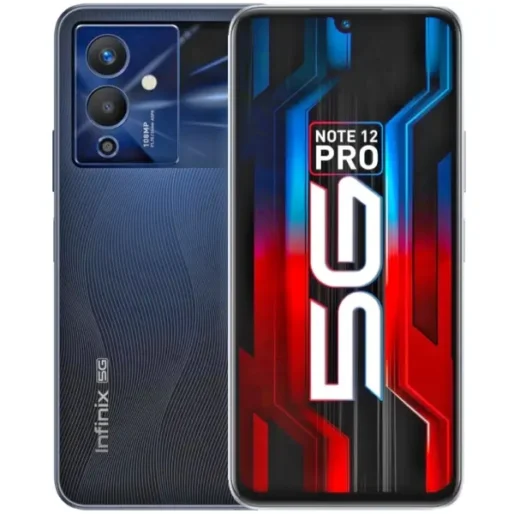
Stock ROM refers to the official software provided by Infinix for the Note 12 Pro 5G X671B device. This firmware package comes pre-installed on your phone and includes the complete operating system with Android 12 and XOS 10.6 interface. The X671B model runs on a MediaTek Dimensity 810 processor with an octa-core CPU configuration featuring two Cortex-A76 cores at 2.4 GHz and six Cortex-A55 cores at 2.0 GHz.
The infinix software download for X671B serves multiple purposes beyond basic operation. Flash files help repair devices facing software issues, bootloop problems, IMEI complications, or complete system failure. In essence, stock firmware enables you to upgrade, downgrade, or reinstall the operating system on your mobile device.
Stock ROM packages contain more than just the system interface. The complete firmware includes the recovery partition, bootloader, modem stack, and other essential components that manage hardware connections with the screen, memory, and SIM cards. These elements work together to ensure proper device functionality.
Official firmware maintains manufacturer approval and hardware certification. The stock ROM receives regular security patches through OTA updates and keeps your warranty intact. Accordingly, flashing official infinix software eliminates the risks associated with unauthorized modifications while restoring your device to its original stable state.
Download Official Firmware Versions for X671B
Multiple infinix software versions exist for the X671B model, each identified by specific build numbers and release dates. The firmware packages range from 3.70 GB to 4.86 GB in file size. Specifically, version V653 released on 220527 measures 4.18 GB, while the latest V664 from 240511 reaches 4.86 GB. Between these releases, you’ll find V881 (220826), V944 (221103), V970 (221220), V994 (230314), V1097 (230614), V1098 (230614), V362 (230728), V407 (230818), V447 (230918), V491 (231204), V525 (240111), and V643 (240326)[84].
Each infinix software download requires the MediaTek MT6833 chipset identifier in the filename[84]. For instance, complete package names follow this format: Infinix_Note_12_Pro_5G_X671B_MT6833_V664_240511.zip. The firmware comes in zip packages containing the flash file, SP Flash Tool, USB drivers, and flashing manual.
Download the stock ROM matching your exact device model to prevent bricking. Verify file integrity after downloading to avoid errors during the flashing process. The X671B uses MediaTek processors, requiring either SP Flash Tool or the Infinix-specific flash tool for installation. In addition, install MediaTek USB VCOM drivers on your computer before attempting any firmware operations.
Need Help? We Are Here for You! 💬
If you have any questions or face any issues while flashing your device, feel free to reach out! We are here to help you every step of the way. 💡
Contact us
Why Choose Dr.Soft Services? 💡
💥 Professional Expertise:
We provide reliable mobile software solutions including firmware, root, FRP, and bootloader services.
💥 Safe & Trusted Methods:
All operations are performed using verified and secure techniques to ensure device stability.
💥 Affordable & Reliable Support:
High-quality technical services at fair prices with consistent and trusted results.
How to Flash Stock ROM on Infinix Note 12 Pro 5G
Before initiating the flashing procedure, charge your X671B to at least 75% battery capacity. Take a complete backup of your data, as flashing will erase all information stored on the device[251]. Enable Developer Options, USB Debugging, and OEM Unlock in your device settings[251].
Install the Infinix Note 12 Pro 5G USB drivers on your computer first. Extract the downloaded infinix software package and launch the flash_tool.exe file from the SP Flash Tool folder. Click the Browser button and navigate to locate the scatter file within the extracted firmware folder.
After loading the scatter file, click the Start button to prepare for flashing. Connect your powered-off X671B to the computer using a USB cable. Press and hold either the Volume Down or Volume Up key while connecting to enable device detection[251].
Once your computer recognizes the device, the flashing process begins automatically and requires 5-10 minutes to complete. A checkmark appears on screen when installation finishes successfully. Close the flash tool, disconnect your device, and power it on. Your X671B now runs the freshly installed infinix software download version you selected.
اترك تعليقاً